 CMSC388J
🚀 Deployment
Finishing touches
Final Project
As part of your Final Project, you must create a web application that is "hosted and useable." This page is dedicated to helping you understand what that means in this context, and how to deploy your application.
Serverless Deployment
For this course, we want you to deploy your application using Vercel, which is a serverless hosting platform. We previously discussed what that means under Large-Scale Applications.
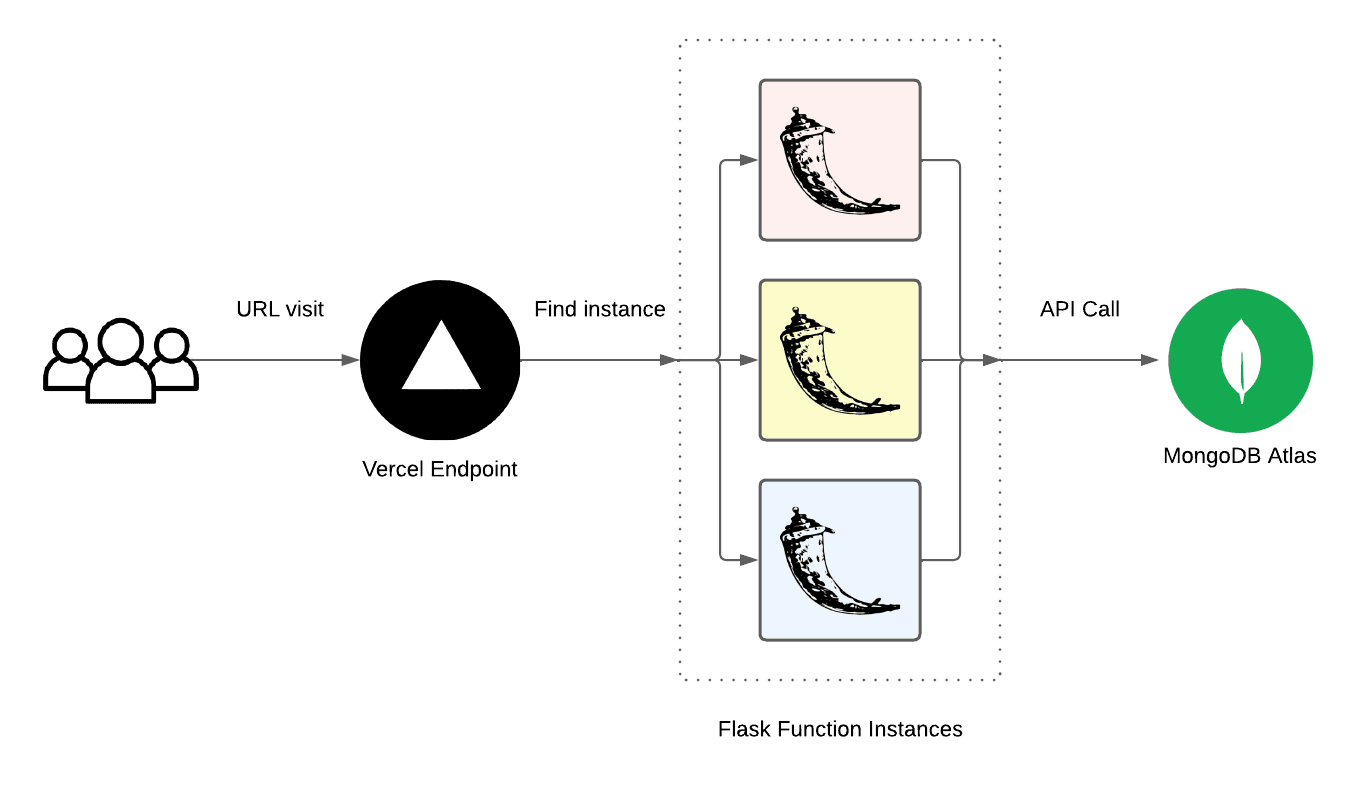
Serverless is plug-and-play: it allows you to host applications without provisioning any hardware yourself. You provide code and a URL, and the cloud provider finds you hardware. In this case, when a user triggers any of your app's endpoint, Vercel invokes your Flask app as a function that is invoked per request.
Serverless web applications cannot maintain in-memory or local state themselves, as servers are dynamically allocated based on demand, and any server could respond to your call. Instead, database management is handled by an external application. In this case, we suggest using MongoDB Atlas to host a database separately.
Here's a diagram summarizing how this works:
Vercel
You can check out our class website's source code as an example of a working real-world Vercel deployment. Vercel also has an official template for Vercel + Flask to reference.
Step-by-step instructions:
- Create
vercel.jsonthat references the file where you instantiateapp.
{
  "version": 2,
  "builds": [{ "src": "app.py", "use": "@vercel/python" }],
  "routes": [{ "src": "/(.*)", "dest": "app.py" }]
}- Create
requirements.txtwith all necessary dependencies, such as MongoDB.
Flask==2.0.3- Deploy
Push to GitHub, then go to vercel.com, click "New Project" and import your repository. Alteratively, run:
npm i -g vercel
vercel
and follow the prompts.
- Set Environment Variables
Add in Vercel dashboard (Settings -> Environment Variables) as needed.
MongoDB Atlas
The previous TAs wrote instructions on setting up MongoDB Atlas that you should use.
Also, if you are using another database provider, you will have to use separate deployments from Vercel as well.