 CMSC388J
Large-Scale Web Applications
How to not be Homeless 101
Scalable Architecture
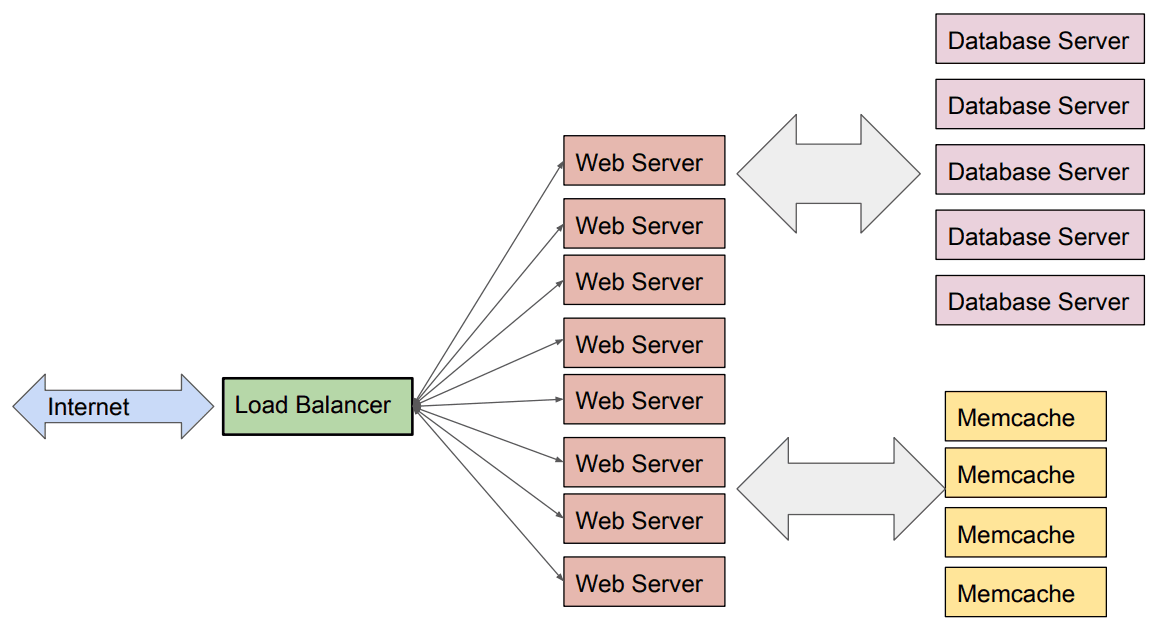
For this course, we built applications with exactly one web server instance (Flask) that connects to a database provider (MongoDB). However, most applications in industry look closer to this:
What does "scaling" mean?
Scalability is the ability of a service to grow to handle many concurrent users (ideally an arbitrarily large number).
There are two ways to scale an application, broadly:
- Vertical Scaling (Scaling Up) - Upgrading your machine. CMSC132 and CMSC216.
- Horizontal Scaling (Scaling Out) - Adding more machines.
| Aspect | Vertical Scaling | Horizontal Scaling |
|---|---|---|
| Ease of Development | Easy - already supported by most software | Harder - requires communication |
| Performance | Okay - modern servers can have ~96 cores | Fast - handles very large workloads |
| Replacements | Bad - single point of failure | Good - redundant nodes |
| Cost Efficiency | Bad - requires expensive hardware | Good - allows for cheap hardware |
| Scalability Limit | Limited - eventually hits hardware ceiling | Virtually unlimited, with good design |
Tl;dr: Horizontal scaling is better, but is more complicated.
Load Balancers
Load balancers take internet requests and routes the request to one of your web servers, ensuring no single server is overloaded. Most common strategies:
- Round Robin: route each request to the next server in a circular order
- Least Connections: route next request to the server with the fewest active connections
Load Balancers can be implemented on different kinds of network software, and even in hardware. The balancing algorithm will depend on how much information it is given by these implementations.
Stateless servers are what make load balancing possible-see the slides on REST APIs.
Scalable Databases
Data Sharding: spreading a database over horizontally scaled instances called "shards." Choose which database to store data in based on a hash function.
Replication: placing more than one copy of the same data.
Initial attempts: Facebook had one database instance per university, at one point.
Distributed Caching
Cache results of recent database queries within a key-value store. Performed on the internet via multiple layers:
- Client/Browser Cache - uses HTTP headers
- CDN Cache – caches static content (images, JS, CSS) close to users
- Application Cache – stores results of expensive database queries, e.g. Memcache and Redis
- Database Cache – built into the database engines themselves
Most notable implementations are Memcache and Redis. Handling state and sessions in horizontally scaled setups requires fast and shared storage, such as with caching.
Cloud Computing
Building the above is hard. In the past, it was the difference between a successful or failed startup, as products often became "viral" without the necessary hardware or expertise to scale.
Cloud Computing's motto is to:
Use servers housed and managed by someone else.
On-Premise vs. Cloud
Here's how buying your own servers compares to using the cloud:
| Aspect | On-Premise Deployment | Cloud Deployment |
|---|---|---|
| Cost | Upfront investment in machines | Pay-as-you-go for resources |
| Scalability | Limited by purhcased machines | Scale as necessary |
| Efficiency | Machines may not be fully-utilized | Providers buy in bulk, optimize utilization |
| Entry Barriers | Staff expertise, machines | Low |
Tl;dr: Buying your own servers is usually less efficient.
Abstractions
Different abstractions allow you to specify how much you want the provider to handle for you.
- Virtual Machines - Manage OS, runtime, scaling, security, etc.
- Containers (e.g., Docker, Kubernetes) - Don’t manage OSes directly, just portable apps.
- Managed Storage (Cloud Databases) - Don’t manage database infrastructure or scaling.
- Serverless Computing - Don’t manage servers, instances, or load balancing.
More on Serverless
This is the deployment approach we suggest for CMSC388J, through Vercel.
All that you provide is code, and a URL that triggers it. The cloud provider then handles machine allocation, scaling, databases, etc. As a result, this is the most constrained abstraction. Developers pay per request.
Content Distribution Network (CDN)
Consider static parts of a Flask application, such as HTML, CSS, and images. It doesn't matter where you get it, it doesn't change often, but obtaining it improves performance greatly.
A CDN is a group of servers set-up by cloud providers to cache static content. They are designed to be geographically distant, with each CDN server only serving nearby users.
Requests for static content are first sent to CDN servers, and given to users if it is found. If not, the request is forwarded to our main (or "origin") servers and databases:
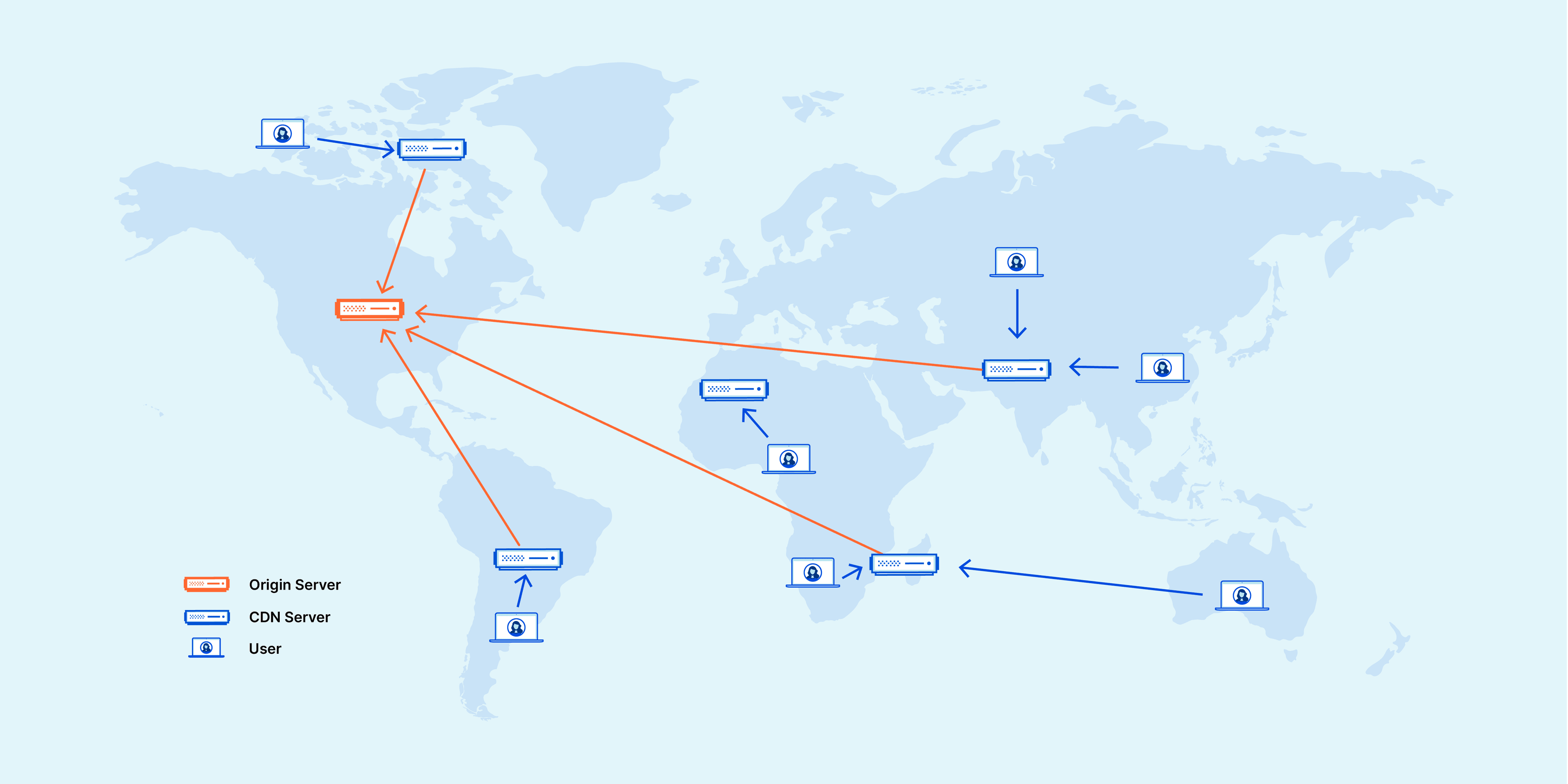 (From the Cloudflare Blog)
The benefits are that app content is served faster and backend load is reduced.